 Spritz Depot
 Sistema e utilità
Descrizione
If you have problems trying to remove stubborn replicants from your desktop or deskbar then this is the Preference for you!
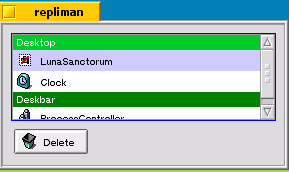
The interface is quite simple - there is a single list containing the names and application icons of the replicants that are on the desktop and the deskbar, and a button to delete the selected replicant in the list.
In the screen shot the desktop has two replicants: Luna Sanctorum and Clock. Luna Sanctorum has a special icon () next to it's name because it is a "zombie", i.e. the application for this replicant has been deleted or haiku cannot find it.
The screen shot also has one replicant on the deskbar: ProcessController. Note, if you have installed the Japanese input server then this will appear in the list but without an icon or a name. If you delete this replicant by mistake do not worry it will reappear automatically next time you run Haiku.
Once you have deleted a replicant it will only stay deleted if you quit the deskbar or tracker normally. So, if the tracker crashes or you kill it then it may not update the file it uses to store information about the replicants and will just reload them when it restarts.
Schermate
Installa
Canale stable v0.1-1
Copia questo URL in HaikuDepot (Repository), poi installa Repliman come qualsiasi altro pacchetto. Nessun client aggiuntivo richiesto.
Installa Spritz Depot per aggiornamenti automatici e installazione in un clicIl file arriva dal server dell'autore: Spritz Depot non ospita i pacchetti, li indica. Scaricandolo a mano lo verifichi tu (con sha256sum); il client Haiku lo verifica al posto tuo.