 Spritz Depot

StateRestore
A small Haiku program that takes the system's packages back to an earlier state, without the boot menu.
 Sistema e utilità
Descrizione
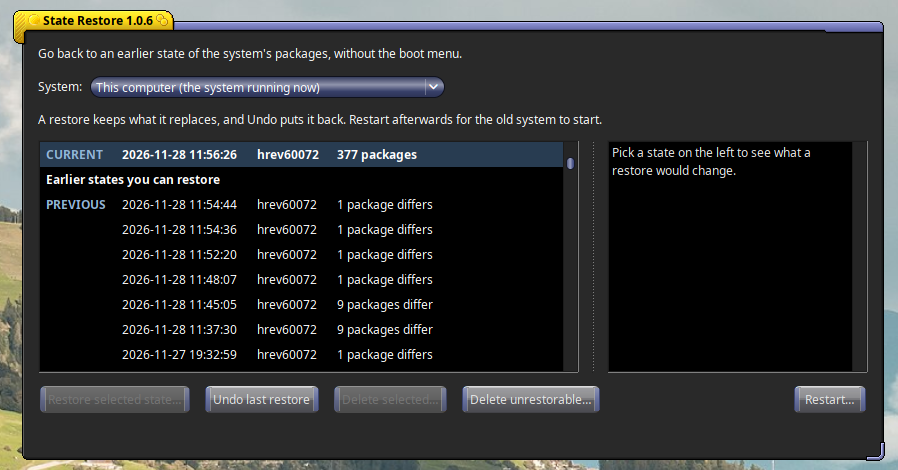
Haiku keeps each earlier state of /boot/system as a folder state_<date>_<time> in /boot/system/packages/administrative/, with the list of the packages that were active in it and the files of the packages that an update took out. StateRestore lists those states, shows what a restore would change (packages whose version changes, are taken out or are put back), and does it: the packages of that state are copied or moved into /boot/system/packages, and the ones that are not in it are moved to a folder of their own, ~/config/var/StateRestore/held/<date>/. Nothing is deleted. Undo last restore puts them back, and the kept packages are looked for when an earlier state needs them again.
Restart afterwards: the kernel and the system libraries come from the haiku package, so a restore of it starts with the next boot.
Several earlier states can be selected and deleted with Delete selected…, after a confirmation that says how much space it frees and how many other states could not be restored any more (the files of a package are kept in the folder of the state that took it out, and an older state can need them). Deleting cannot be undone. The system running now is never touched.
The states that cannot be restored are shown too, under "Cannot be restored", dimmed and marked DAMAGED (their list of packages is damaged, which a shutdown in the middle of a write can cause), MISSING (package files they need are gone) or SAME (nothing to restore). Selecting one explains why.
Delete unrestorable… deletes all of those states, after a confirmation that counts each kind. A state whose folder holds package files that a restorable state needs is kept, and the confirmation says how many.
The window also has Restart…, with a confirmation.
It only helps when the system still boots. A system that does not start at all needs the boot menu or a rescue disk. Only the system packages are handled, not the ones in ~/config/packages. Another Haiku on another partition
Run StateRestore from a Haiku that works to repair one that does not start. Mount the other Haiku's partition (it shows as /Haiku1, say), then choose it in the System menu at the top of the window (every mounted volume that holds a Haiku is listed, or pick Another folder...). From the command line: StateRestore --root /Haiku1 --list, and the same for the other commands.
The window then works on that system's states: restoring, undoing and deleting. Because no package daemon runs there, a restore also writes that system's list of active packages (what it reads when it starts) and keeps what it took out as a new state_<date>_<time> folder of that system, as the daemon would, so that Undo or the boot menu can go back. Start from that system afterwards. Restart is greyed out there, since it would restart the system you are running.
The partition must be mounted with write access.
Schermate
Installa
Canale stable v1.0.6
Copia questo URL in HaikuDepot (Repository), poi installa StateRestore come qualsiasi altro pacchetto. Nessun client aggiuntivo richiesto.
Installa Spritz Depot per aggiornamenti automatici e installazione in un clicIl file arriva dal server dell'autore: Spritz Depot non ospita i pacchetti, li indica. Scaricandolo a mano lo verifichi tu (con sha256sum); il client Haiku lo verifica al posto tuo.
x86_64
sha256: 08e15aaa8b59717cb72797dfe6093ae5e2f1f321d091c602beb2bf2a269bc971
x86_gcc2
sha256: 4f6c9fa44b7aa4b517556651224ebd7f046246193f3817722890db185ebe3edb